How far behind is this site?
A site’s page now counts the commits that have not shipped yet, and says so out loud once there are enough of them to matter.
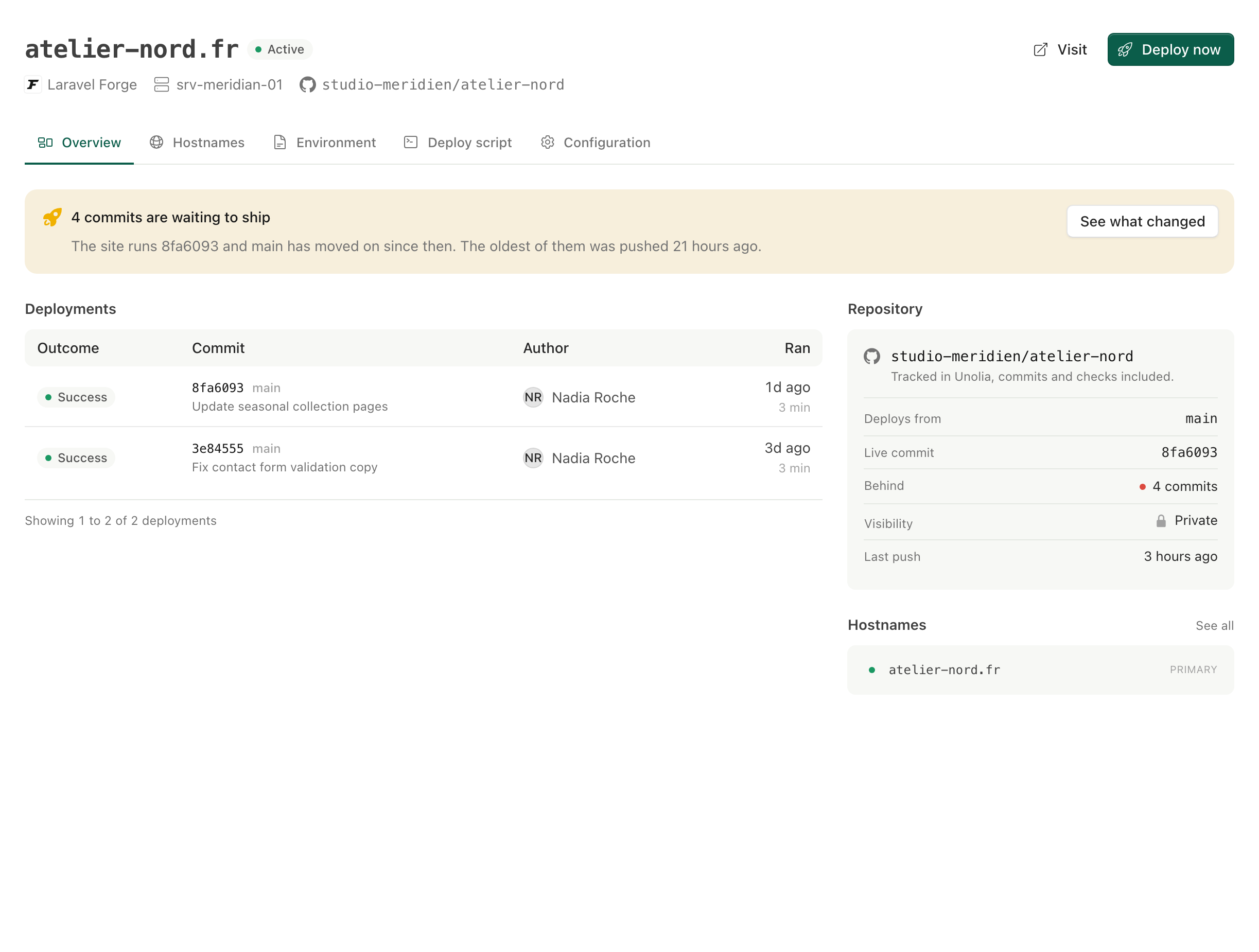
The site page in Unolia used to print the live commit and the last push next to each other and leave you to do the subtraction. It does it now.
The Repository panel gains a Behind row with the number of commits between what the site is running and the head of the branch it deploys from. Past two commits, or one commit that has been waiting more than a day, a band above the page says how many are waiting, which commit is live and how long the oldest has sat there, and ends on the list of what changed.
The running commit comes from the newest successful deployment, because those arrive by webhook and stay current, while the provider’s own record only moves on a resync. On my own production site that column sat three deploys stale and would have reported 74 commits behind where the honest answer was 4.
When Unolia cannot know, it says nothing. A site deploying a branch Unolia does not sync, a repository it does not track, or a running commit outside the history your plan keeps all render no number rather than a wrong one.